






















Play Anywhere with Casino GoldenRoo App
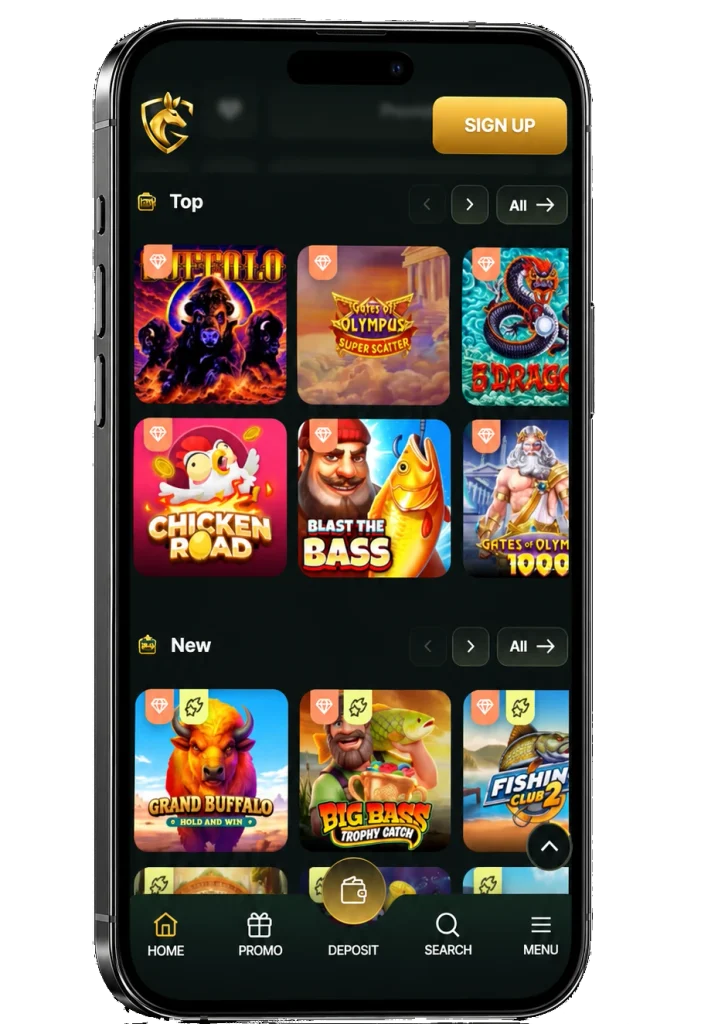
You can use the GoldenRoo app for Android and iOS in order to be able to play casino games on the go. More specifically, the mobile Golden Roo casino app is currently being developed, and you can now use the mobile website of the casino, or get the PWA version for Android or iOS. Both of these versions are free to get and have the same options for playing, as well as the same bonuses. You will also be able to use it to sign up for a new account if you don’t have one, and take part in the VIP program to improve your rewards from playing pokies.


How to Install GoldenRoo App for iPhone
The iOS GoldenRoo official mobile app is also being developed now, so using the PWA app is the best option right now. Installing it is not more difficult than doing so on Android at all, since you will just need to:
- Open Safari and go to GoldenRoo.
- Press the “Share” button on the bottom of the browser.
- Tap on “Add to Home Screen”.
- Check the correctness of the link, and name the app “GoldenRoo” or however you like.
- Confirm adding the app, and enjoy.
Now, the app will be present on your device, and you can use it to play whenever and wherever you like.
How to Install Golden Roo App for Android
Before being able to use the App GoldenRoo mobile app on Android, you will have to add the PWA to your home screen. It will work just like the regular website, but will be present on your home screen and work as a shortcut, so you won’t need to open your browser every time. If you want to get it, here is what you will need to do:
- Open Chrome, Opera or any other browser of your Android device and visit Goldenroo.
- Press the menu button, which has the icon of 3 lines, usually on the bottom of the browser.
- Find the “Install” or “Add to Home Screen” button in the menu.
- Check if the link is correct, and name the app however you like.
- Confirm adding the app to your home screen.
The icon of the app will appear on your home screen, so you can tap on it, log in or sign up, and start playing.
Mobile Login
Some players think that using the mobile app necessarily means that you have to have a separate account, but that is not true. If you already have an account at GoldenRoo, you can just use it to continue playing no matter where you are, and you will only need to log into your account to do so. Just open the app, then tap on the “Login” button and enter your email and password, then confirm and start using your account on the go.
If you don’t have an account, however, you can use the mobile app to sign up. For that, you will need to:
- Open the GoldenRoo app.
- Tap on the “Sign Up” button.
- Enter the email which you will be using for verifying your account later.
- Create a strong password. It has to contain both lowercase and uppercase letters, as well as numbers and symbols.
- Choose Australia as your country.
- Enter the promo code if you have one.
- Agree to the Terms and Conditions and Privacy Policy, then finish the registration.
Mobile Interface
The mobile interface of the GoldenRoo app is one of its biggest benefits for playing on the go. Since the functionality of the app of Golden Roo is the same, the casino made sure that the app is very comfortable to use on any devices. The app will perfectly adapt to the size of any screen, and nothing overlaps, so the games will be both fun to play and won’t bring you any issues. In the app, you can open the menu to see all of the pages, including the casino section, promotions, VIP program, support, and more.

How to Play in the Mobile GoldenRoo Version
The process of playing casino games in the mobile version of GoldenRoo is not at all different from the desktop version. You will just need to open the app and log into your account, then make a deposit of at least 17 AUD using Visa, Mastercard, Apple Pay, or cryptocurrencies. Then, open any game you are interested in, select the bet amount depending on your preferences, and press “Play” or “Spin” to start.